
Pathology has remained largely static for over a century: tissue fixed on glass, glass mounted on a microscope stage, and a pathologist confined to a physical office. Digital pathology disrupts these three constraints, ushering in a paradigm shift toward data-driven diagnostics.
This guide provides a comprehensive technical overview: defining the modality, optimizing the diagnostic workflow, evaluating capital expenditures, and projecting the trajectory of computational integration.
What Is Digital Pathology?
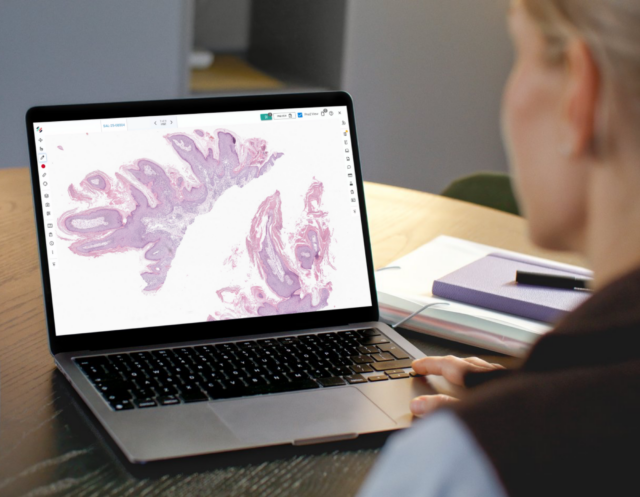
Digital pathology is the practice of digitizing specimen data to facilitate the acquisition, management, and interpretation of pathology information in a computer-mediated environment. Rather than utilizing a traditional light microscope for primary diagnosis, glass slides are processed via high-throughput scanners to generate Whole Slide Images (WSI). These ultra-high-resolution, multi-gigapixel files are then rendered on high-definition medical-grade displays for remote or local sign-out.
A robust digital pathology system comprises four critical pillars:
- Whole Slide Imaging (WSI) Scanners: Optomechanical devices that digitize glass slides into high-fidelity image files.
- Digital Pathology Software (Viewer): A sophisticated interface allowing pathologists to navigate, pan, and annotate virtual slides at varying magnifications.
- Image Management System (IMS): A secure repository for the storage, retrieval, and algorithmic routing of digital cases.
- Bidirectional Laboratory Information System (LIS) Integration: A seamless handshake with the LIS to synchronize patient metadata and diagnostic reporting.
By replacing the traditional microscope as the primary diagnostic interface, these systems introduce computational capabilities that exceed the limitations of analog optics.
Digital Pathology Workflow: From Biopsy to Sign-Out
Modern digital pathology transcends simple image capture; it optimizes the entire specimen lifecycle.
1. Specimen Procurement and Tissue Handling
The process begins with the acquisition of a core biopsy, surgical resection, or cytology specimen. Traditional workflows often suffer from tissue fragmentation or loss of orientation during transport. Advanced digital systems, such as Lumea’s, utilize specialized tissue-handling devices to maintain spatial orientation and specimen integrity at the point of extraction.
2. Histologic Processing
Tissue undergoes standard processing: fixation, paraffin embedding, microtomy (sectioning), and staining (typically H&E or IHC). While this stage remains physical, the transition to digital begins immediately following coverslipping.
3. High-Throughput Digitization (Scanning)
Glass slides are loaded into a WSI scanner. The system captures the entire tissue area at high numerical aperture (typically equivalent to 20x or 40x magnification). The resulting WSI provides a continuous focal plane, allowing for rapid digital “zooming” without the mechanical latency of changing objectives.
4. Virtual Interpretation and Diagnosis
The WSI is routed to a specialized viewer. Pathologists can navigate the specimen, utilize digital measurement tools, and apply annotations to Regions of Interest (ROI). This environment facilitates ergonomic sign-out from any location with secure, high-speed network access.
5. Computational Pathology and AI Augmentation
Third-party AI algorithms can be deployed directly into the workflow. These tools perform quantitative analysis—such as mitotic figure counting, biomarker quantification (e.g., Ki-67, HER2), and automated screening for micrometastases. AI serves as a “first-look” or concurrent assist, reducing cognitive load and intra-observer variability.
6. Synoptic Reporting and LIS Synchronization
The final diagnosis is integrated into a synoptic report and transmitted back to the LIS. The digital nature of the workflow ensures a robust audit trail and significantly reduces the turnaround time (TAT) by eliminating physical slide distribution.
Digital Pathology vs. Traditional Light Microscopy
| Feature | Traditional Microscopy | Digital Pathology |
| Diagnostic Interface | Optical eyepieces (fixed location) | High-res monitors (location-agnostic) |
| Consultation | Physical slide shipping (24–72 hours) | Instant link/portal access (seconds) |
| Image Analysis | Manual/Qualitative estimation | Algorithmic/Quantitative precision |
| Archiving | Physical slide libraries (degrades/breaks) | Redundant digital storage (lossless) |
| Ergonomics | Static posture (neck/back strain) | Dynamic, ergonomic workstation |
| Case Integration | Manual cross-referencing of files | Side-by-side digital comparison |
The honest answer is that traditional microscopy isn’t going away; glass slides will be part of pathology workflows for years. But digital pathology removes the bottlenecks that have held back efficiency, collaboration, and the adoption of AI-powered tools.
Technical and Clinical Benefits of Digital Pathology
For Pathologists
Remote work is the most immediate benefit: pathologists are no longer tied to a single location or institution. A subspecialty expert in Boston can consult on a case in rural Utah without shipping slides. But beyond location flexibility, digital pathology changes the nature of diagnostic work:
- Side-by-side viewing of multiple slides simultaneously, impossible with a single microscope
- Instant access to prior cases for comparison
- Annotation tools that create a documented, shareable diagnostic record
- Better ergonomics, no hunching over an eyepiece for hours
- AI augmentation for high-volume, repetitive analysis tasks
- Remote sign-out with work-from-home capabilities and multi-site coverage
- Enhanced precision with access to digital measurement tools and side-by-side comparison of different stains (e.g., H&E and IHC) on the same screen
- Eliminates the “glass sorting” and manual retrieval of historical slides
For Labs
- Reduction in courier costs and physical storage footprints
- Automated identification of tissue artifacts or out-of-focus scans prior to pathologist review
- Allows the lab to increase volume without a linear increase in physical administrative staff
- A permanent, searchable digital archive that doesn’t degrade over time
For the Patient
- Faster diagnostic intervals lead to expedited treatment planning
- Enables rapid “tele-consults” with world-renowned experts, regardless of geography
Regulatory Status and FDA Clearance
As of 2026, the FDA has established a clear pathway for WSI systems intended for primary diagnosis. Following the 2017 de novo clearance of the first WSI system and the expanded enforcement policies of 2020, digital pathology is now a recognized standard of care. Platforms like Lumea’s Viewer+ are engineered to meet stringent clinical validation requirements for surgical pathology.
FDA Premarket Notification Database: 510(k) Number K242244 for Viewer+
Evaluating Digital Pathology Systems (DPS)
When selecting a DPS, stakeholders must prioritize:
- Rendering performance: The ability to stream multi-gigabyte images without latency (tiling/stuttering) is paramount for user adoption.
- Interoperability: The system must be scanner-agnostic and offer deep integration with EHRs and LIS (e.g., Epic Beaker, Sunquest).
- Open AI ecosystem: Ensure the software allows for the integration of diverse, third-party computational tools rather than a closed, proprietary “walled garden.”
- Access control and audit trails: Pathology is regulated. Your software needs role-based access, a complete audit log, and compliance with CAP/CLIA requirements.
Lumea’s platform was designed around these exact requirements: a web-based viewer with LIS integration, an open AI ecosystem, and full access from any device.
Challenges to Implementation
- Capital expenditure (CAPEX): Initial investment in scanners and IT infrastructure (high-speed networking and petabyte-scale storage).
- Validation requirements: Labs must perform internal validation studies (per CAP guidelines) to ensure diagnostic concordance between digital and glass slides.
- Data management: Managing the high data throughput of WSI requires a robust strategy for “hot” and “cold” storage.
- Temporary workflow disruption: Any change to an established lab workflow creates friction. Staff training and change management matter as much as the technology itself.
None of these are dealbreakers; they’re planning requirements. Labs that have implemented digital pathology successfully invest as much in workflow design as they do in the technology.
What Is Digital Pathology Used For? Key Applications
Primary diagnosis: The core use case, where pathologists diagnose surgical pathology cases from digital images instead of glass slides.
Teleconsultation and second opinions: Sending cases to subspecialty experts or academic centers without shipping physical slides.
Tumor boards: Displaying cases on a shared screen during multidisciplinary tumor board meetings, with full zoom and annotation capability.
Medical education: Teaching pathology with a digital library of cases rather than glass slide collections.
Research and clinical trials: Digital images can be analyzed at scale with AI, enabling biomarker discovery and quantitative research that isn’t possible with manual microscopy.
AI development and deployment: Every major AI pathology company builds and validates models on digital pathology images.
The Future: Computational Pathology
The industry is moving toward Computational Pathology, where the WSI is not just a picture, but a data set. Future developments include:
- Predictive Analytics: AI that predicts molecular signatures or treatment responses directly from H&E morphology.
- Integrated Spatial Biology: Combining WSI with spatial transcriptomics for a “multi-omic” view of the tumor microenvironment.
- Decentralized Expert Networks: A globalized marketplace for subspecialty expertise, removing the “silo” effect of physical hospitals.
Lumea remains at the forefront of this evolution, providing the integrated infrastructure necessary for a fully digital, AI-ready diagnostic environment.
Frequently Asked Questions
What is the difference between digital pathology and computational pathology?
Digital pathology refers to the broader practice of digitizing and managing pathology images. Computational pathology specifically refers to the use of algorithms and AI to analyze those images. All computational pathology requires digital pathology, but not all digital pathology uses computational analysis.
Does digital pathology replace the pathologist?
No. It changes how and where pathologists work, not whether they’re needed. AI tools assist with specific tasks, like counting cells and flagging regions, but the interpretive diagnosis remains the pathologist’s domain.
How long does it take to implement a digital pathology system?
Implementation timelines vary by lab size and complexity. A typical deployment, including scanner installation, software integration, LIS connection, and FDA validation, runs three to nine months. Lumea is designed to reduce implementation complexity, particularly around LIS integration and remote access setup.
What scanners work with digital pathology software?
Most modern digital pathology platforms, including Lumea, support images in standard WSI formats (SVS, NDPI, MRXS, etc.) from major scanner manufacturers including Leica, Hamamatsu, Philips, and 3DHistech. Lumea is scanner-agnostic.
Is digital pathology reimbursable?
Reimbursement for these services is evolving. CMS has issued guidance on billing for remote pathology services, and many private payers have followed. Your billing team should review current CPT codes and payer policies specific to your service mix.
Ready to see digital pathology in action? Request a demo of Lumea’s platform by filling out the form below.